/a2a - Agent Gateway (A2A Protocol)
| Feature | Supported |
|---|---|
| Logging | ✅ |
| Load Balancing | ✅ |
| Streaming | ✅ |
LiteLLM follows the A2A (Agent-to-Agent) Protocol for invoking agents.
Adding your Agent
You can add A2A-compatible agents through the LiteLLM Admin UI.
- Navigate to the Agents tab
- Click Add Agent
- Enter the agent name (e.g.,
ij-local) and the URL of your A2A agent
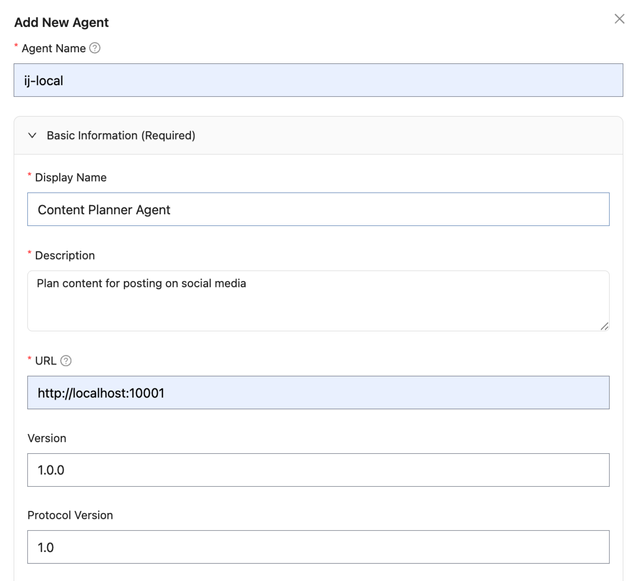
The URL should be the invocation URL for your A2A agent (e.g., http://localhost:10001).
Invoking your Agents
Use the A2A Python SDK to invoke agents through LiteLLM:
base_url: Your LiteLLM proxy URL +/a2a/{agent_name}headers: Include your LiteLLM Virtual Key for authentication
from uuid import uuid4
import httpx
import asyncio
from a2a.client import A2ACardResolver, A2AClient
from a2a.types import MessageSendParams, SendMessageRequest

# === CONFIGURE THESE ===
LITELLM_BASE_URL = "http://localhost:4000"  # Your LiteLLM proxy URL
LITELLM_VIRTUAL_KEY = "sk-1234"             # Your LiteLLM Virtual Key
LITELLM_AGENT_NAME = "ij-local"             # Agent name registered in LiteLLM
# =======================

async def main():
    base_url = f"{LITELLM_BASE_URL}/a2a/{LITELLM_AGENT_NAME}"
    headers = {"Authorization": f"Bearer {LITELLM_VIRTUAL_KEY}"}

    async with httpx.AsyncClient(headers=headers) as httpx_client:
        # Resolve agent card and create client
        resolver = A2ACardResolver(httpx_client=httpx_client, base_url=base_url)
        agent_card = await resolver.get_agent_card()
        client = A2AClient(httpx_client=httpx_client, agent_card=agent_card)

        # Send a message
        request = SendMessageRequest(
            id=str(uuid4()),
            params=MessageSendParams(
                message={
                    "role": "user",
                    "parts": [{"kind": "text", "text": "Hello, what can you do?"}],
                    "messageId": uuid4().hex,
                }
            ),
        )
        response = await client.send_message(request)
        print(response.model_dump(mode="json", exclude_none=True))

if __name__ == "__main__":
    asyncio.run(main())
Streaming Responses
For streaming responses, use send_message_streaming:
from uuid import uuid4
import httpx
import asyncio
from a2a.client import A2ACardResolver, A2AClient
from a2a.types import MessageSendParams, SendStreamingMessageRequest

# === CONFIGURE THESE ===
LITELLM_BASE_URL = "http://localhost:4000"  # Your LiteLLM proxy URL
LITELLM_VIRTUAL_KEY = "sk-1234"             # Your LiteLLM Virtual Key
LITELLM_AGENT_NAME = "ij-local"             # Agent name registered in LiteLLM
# =======================

async def main():
    base_url = f"{LITELLM_BASE_URL}/a2a/{LITELLM_AGENT_NAME}"
    headers = {"Authorization": f"Bearer {LITELLM_VIRTUAL_KEY}"}

    async with httpx.AsyncClient(headers=headers) as httpx_client:
        # Resolve agent card and create client
        resolver = A2ACardResolver(httpx_client=httpx_client, base_url=base_url)
        agent_card = await resolver.get_agent_card()
        client = A2AClient(httpx_client=httpx_client, agent_card=agent_card)

        # Send a streaming message
        request = SendStreamingMessageRequest(
            id=str(uuid4()),
            params=MessageSendParams(
                message={
                    "role": "user",
                    "parts": [{"kind": "text", "text": "Hello, what can you do?"}],
                    "messageId": uuid4().hex,
                }
            ),
        )

        # Stream the response
        async for chunk in client.send_message_streaming(request):
            print(chunk.model_dump(mode="json", exclude_none=True))

if __name__ == "__main__":
    asyncio.run(main())
Tracking Agent Logs
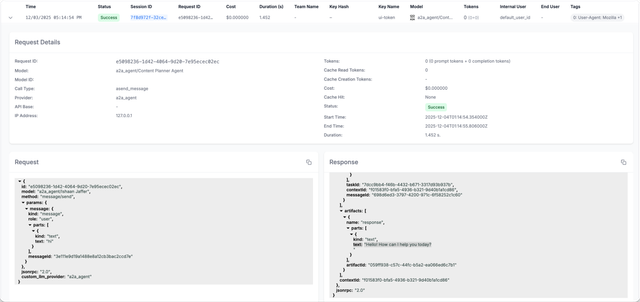
After invoking an agent, you can view the request logs in the LiteLLM Logs tab.
The logs show:
- Request/Response content sent to and received from the agent
- User, Key, Team information for tracking who made the request
- Latency and cost metrics
API Reference
Endpoint
POST /a2a/{agent_name}/message/send
Authentication
Include your LiteLLM Virtual Key in the Authorization header:
Authorization: Bearer sk-your-litellm-key
Request Format
LiteLLM follows the A2A JSON-RPC 2.0 specification:
{
  "jsonrpc": "2.0",
  "id": "unique-request-id",
  "method": "message/send",
  "params": {
    "message": {
      "role": "user",
      "parts": [{"kind": "text", "text": "Your message here"}],
      "messageId": "unique-message-id"
    }
  }
}
Response Format
{
  "jsonrpc": "2.0",
  "id": "unique-request-id",
  "result": {
    "kind": "task",
    "id": "task-id",
    "contextId": "context-id",
    "status": {"state": "completed", "timestamp": "2025-01-01T00:00:00Z"},
    "artifacts": [
      {
        "artifactId": "artifact-id",
        "name": "response",
        "parts": [{"kind": "text", "text": "Agent response here"}]
      }
    ]
  }
}
Agent Registry
Want to create a central registry so your team can discover what agents are available within your company?
Use the AI Hub to make agents public and discoverable across your organization. This allows developers to browse available agents without needing to rebuild them.